
One of the biggest inspiration platforms for UX and UI designers is Mobbin. They’ve just released their MCP, which allows you to connect your favorite AI tools to their entire catalog of over 600,000+ real design pattern and flow examples from real apps.
This opens up a world of possibilities for both research and UI design.
I’m going to show you exactly how to connect Mobbin to your AI tools and real use cases of what I’m doing with it right now as a product designer.
The Biggest Missing Piece in AI UX/UI Design Right Now
Getting anything good out of AI right now requires a lot of input, examples, and prompting. Otherwise, the AI is doing a lot of guessing. It’s guessing at what you mean when you describe visuals with words, and approximating what effective onboarding flows and checkout flows actually are.
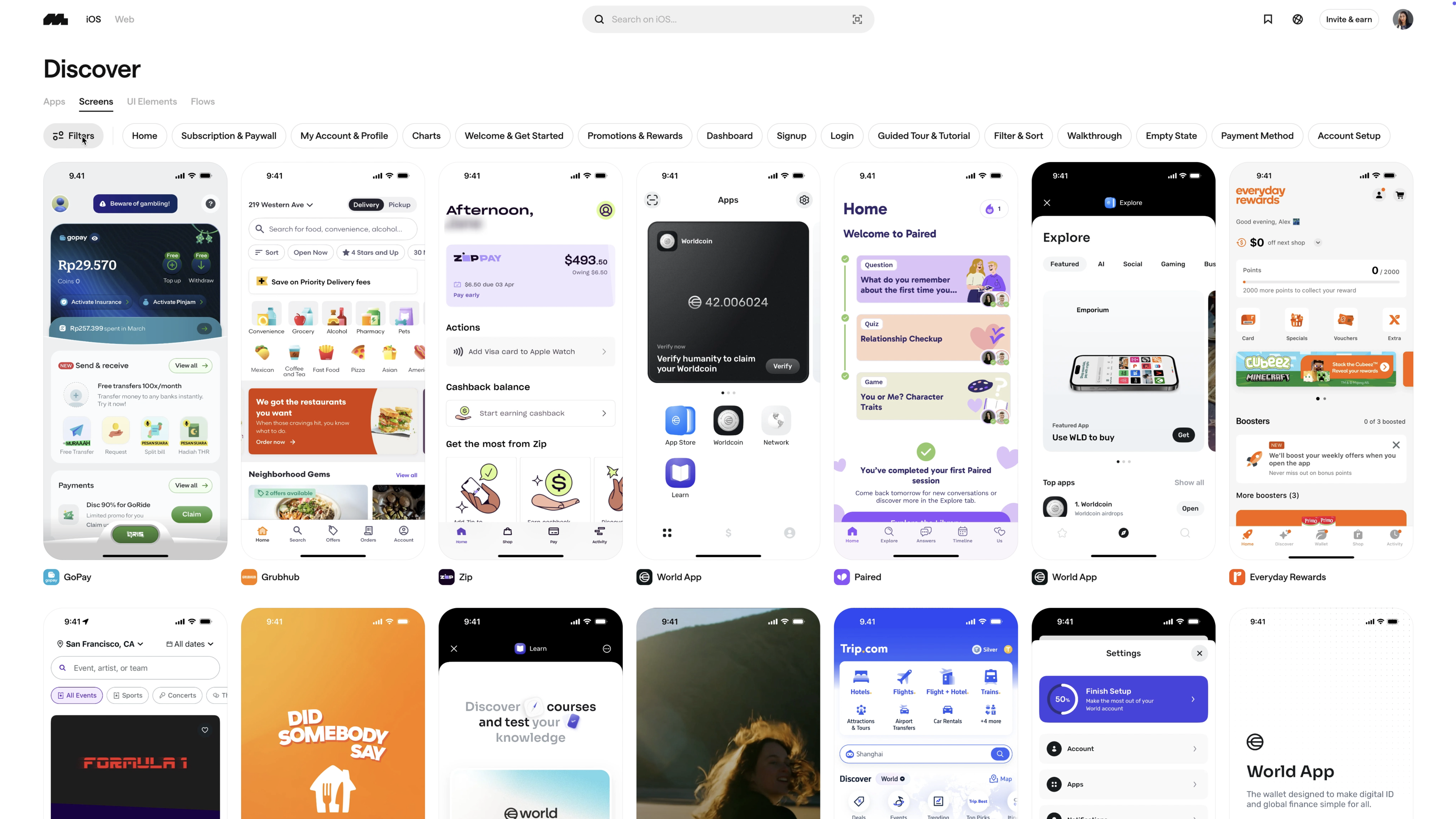
But with Mobbin’s new MCP, you can start training it with real examples so it can give you something more intentional and accurate.
So let’s go through this together.
Installing the Mobbin MCP + Claude Code
First, use the link in the description to grab the Mobbin MCP and install it. Yes, you will need a plan to do this, but it’s very affordable. Most of you probably already have a subscription. The Pro plan is just $10 a month and gives you access to everything.
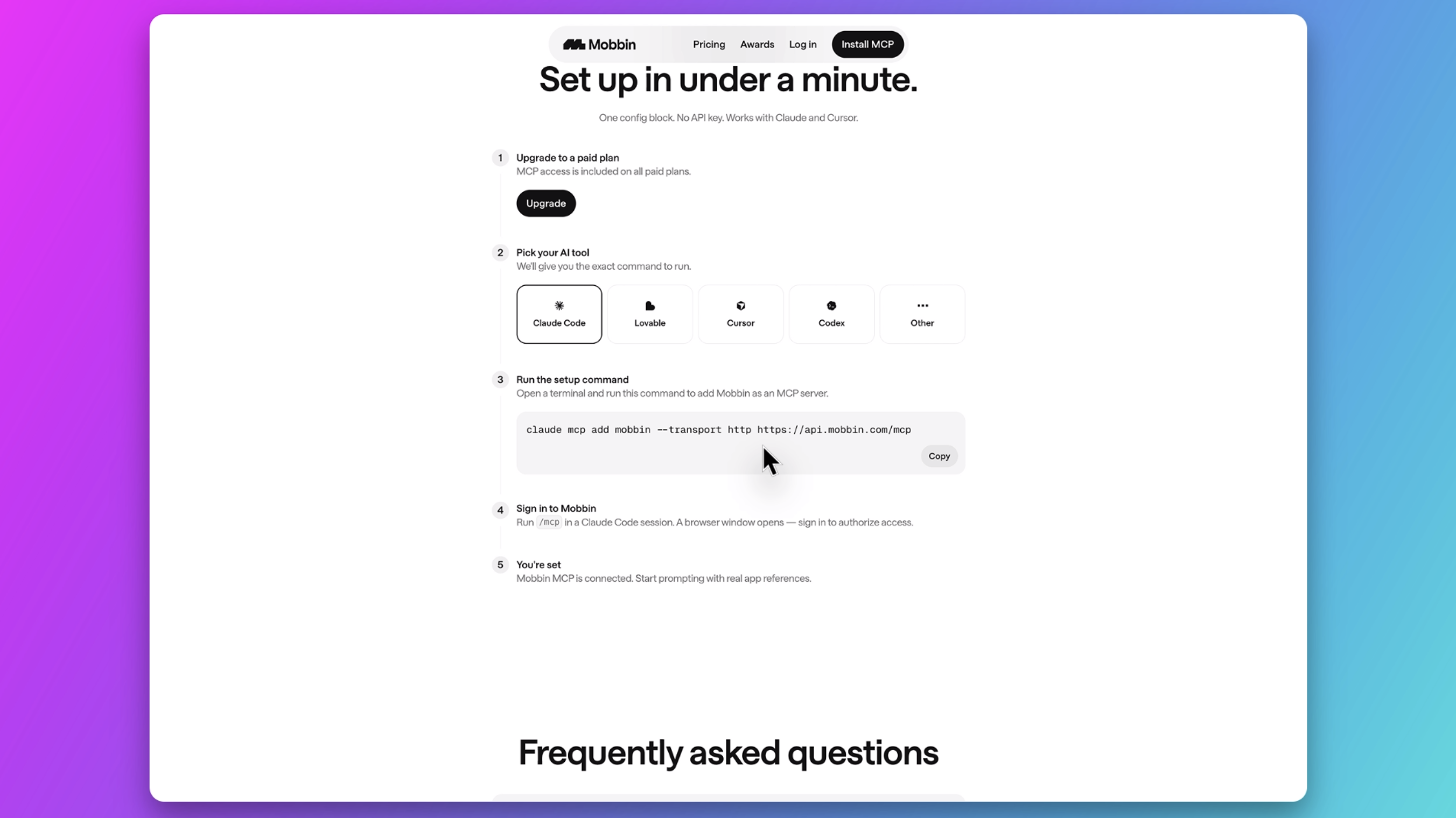
For this example, I'm going to install it with Claude Code (but it's a similar process with any AI agent - just follow the steps that Mobbin provides).
Setting Up & Authenticating Mobbin MCP in Terminal
I had some issues authenticating Mobbin MCP from inside of Claude desktop so I'm going to use the command line to do this. I know it can seem a little scary to use terminal, but this one is quite simple and result in fewer errors, so just follow along with me and we’ll do it together.
💡Prerequisites: A paid Mobbin plan
All you need to do is copy these commands and paste them along as we go. You can do this using Terminal on your Mac or Bash on your Windows.
Step 1 — Add the MCP server via Terminal
Open Terminal and run:
claude mcp add --transport http mobbin https://api.mobbin.com/mcpStep 2 (if needed) — Add it to your project directory
If you have Claude installed somewhere other than your home directory then replace [yourdirectory], and paste the following command and hit enter:
cd /Users/[yourdirectory]/Claude claude mcp add --transport http mobbin https://api.mobbin.com/mcpStep 3 — Open Claude Code in Terminal
Type the following into Terminal and hit enter:
claudeStep 4 — Open the MCP manager
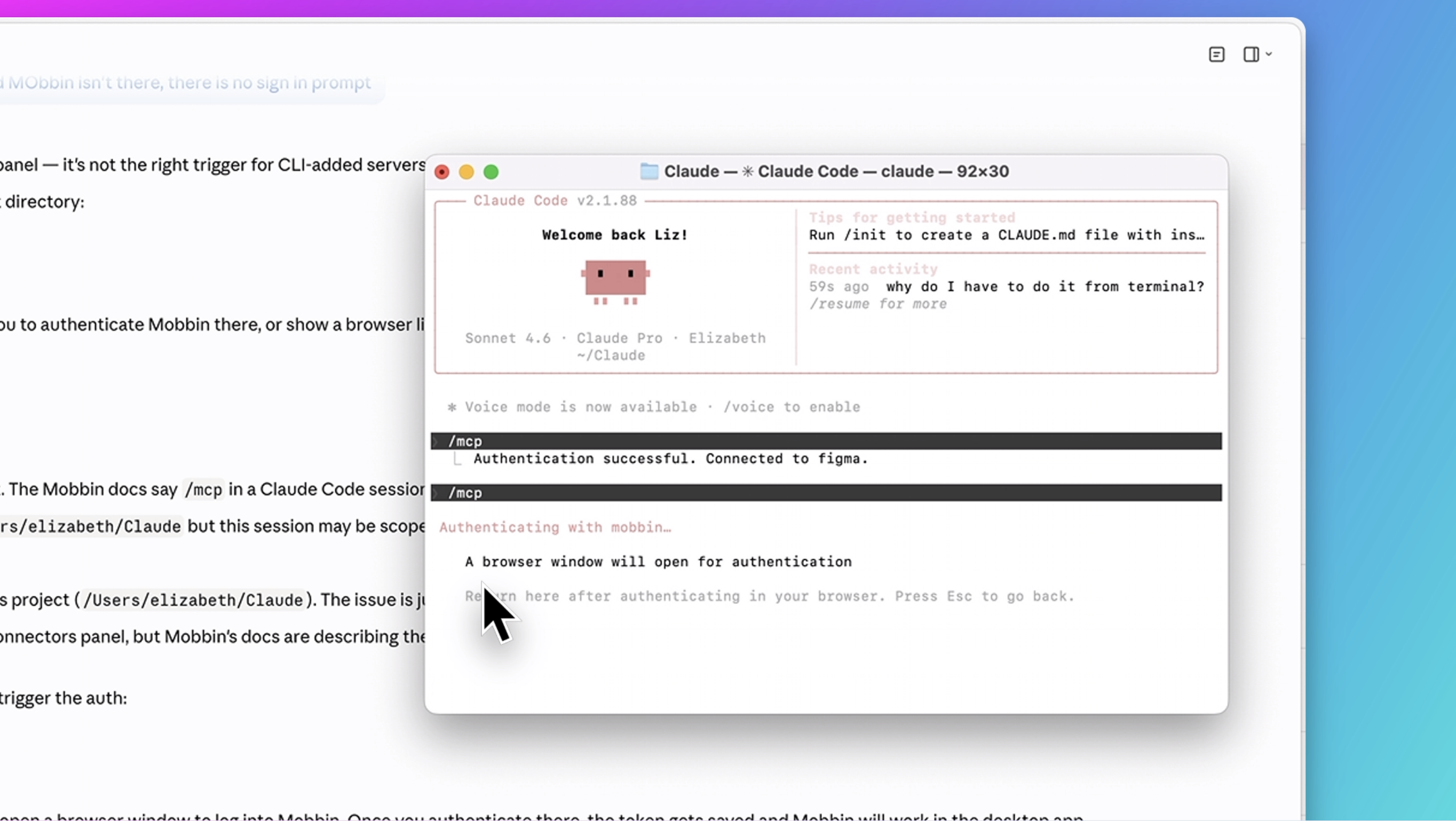
Type /mcp and press Enter
You'll see a list of your MCP servers:
figma · ✓ connectedmobbin · ⚠ needs authentication
Step 5 — Select Mobbin to authenticate
Use your ↑ ↓ arrow keys to navigate to mobbin and press Enter
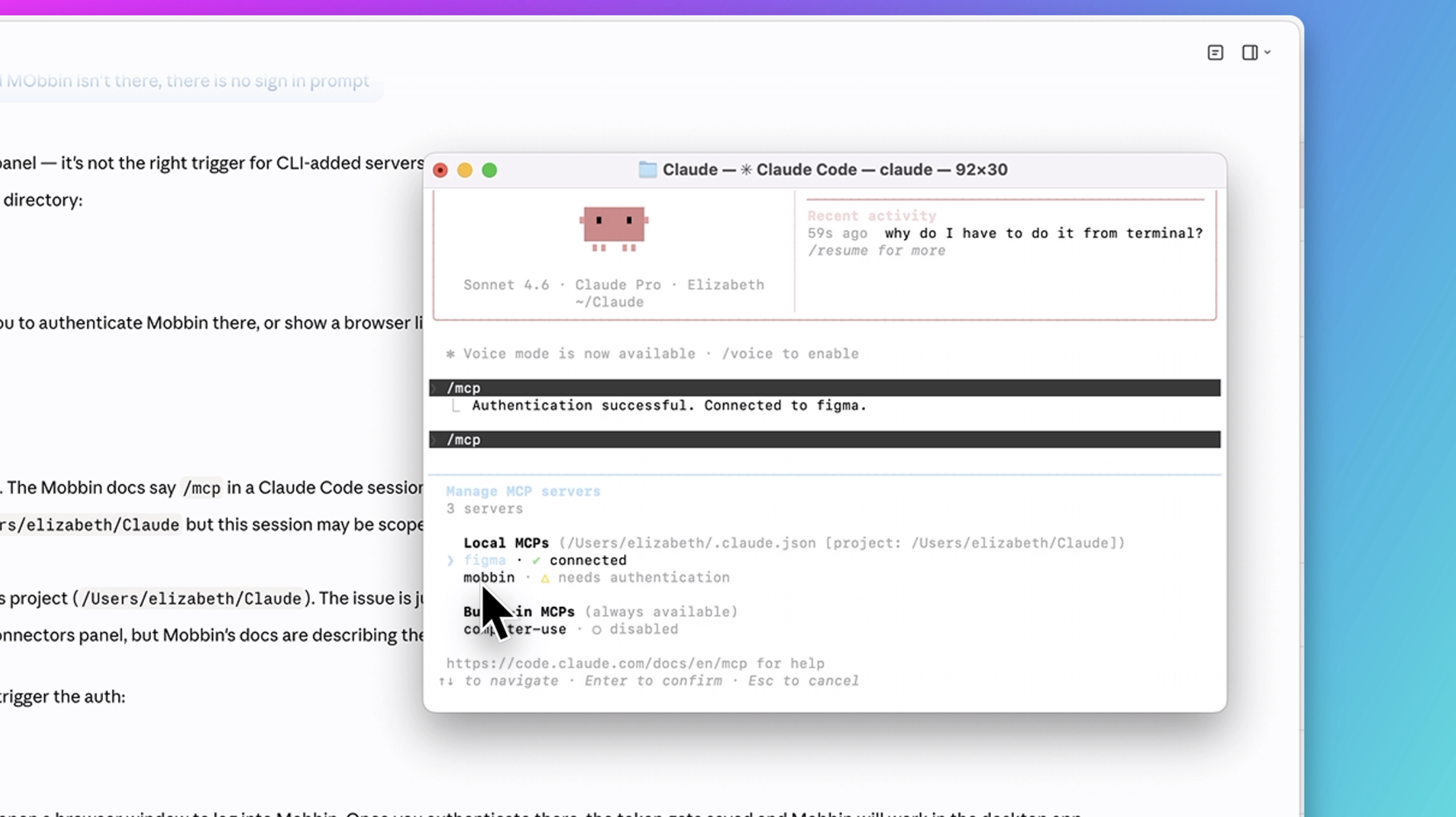
Step 6 — Complete browser authentication
The terminal will show:
"A browser window will open for authentication"
"Return here after authenticating in your browser. Press Esc to go back."
A browser window opens — sign into your Mobbin account and authorize the connection.
Step 7 — Return to Terminal
Once authenticated in the browser, return to the terminal. Mobbin will now show as connected.
You can now use Mobbin in both the terminal and the Claude Code desktop app. ✅
So if you have trouble doing it inside the Claude Code desktop app, use Terminal. It gives you more direct access and makes things cleaner.
Use Case 1: Analyzing Patterns and Flows with AI
Now back in Claude Code desktop, I’m ready to try this out.
I’m going to paste in a prompt and ask it to analyze the top onboarding flows from Mobbin and give me four examples.
Prompt:
Please analyze the top rated onboarding flows from Mobbin and give me 4 examples
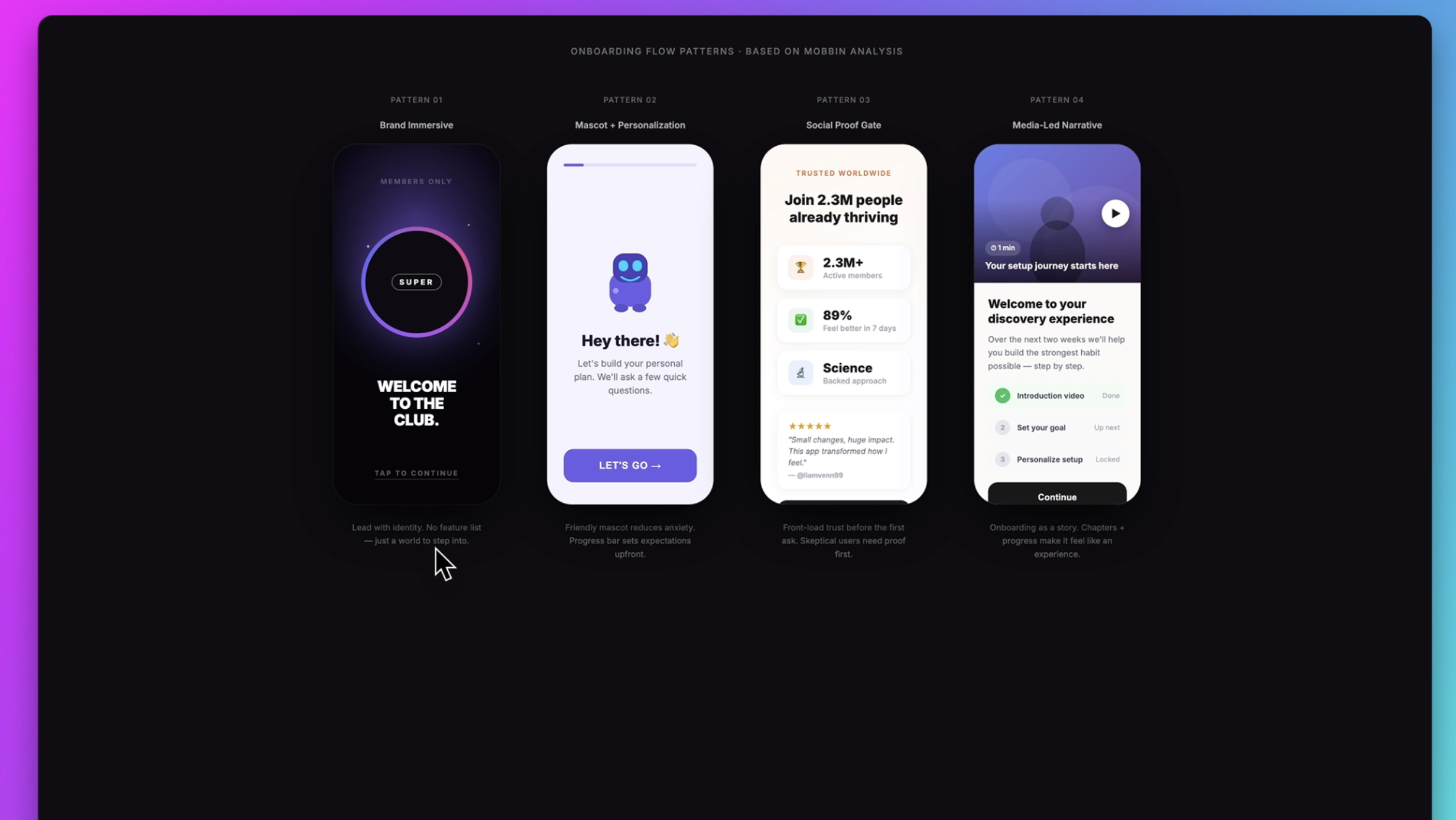
I clicked the link inside Claude Code and it’s showing me these four patterns and examples:
- Brand immersive
- Lead with identity
- Mascot and personalization
- Social proof gate
- Media narrative
This is amazing because if you need to analyze existing patterns and see the full range of options, you can use this to help you decide which pattern matches your own user research best.
It takes a lot of the guessing out of the process.
And now, you can reference these examples when you generate something with AI, or when you’re designing these flows manually in Figma.
Use Case 2: Copywriting, UX Writing and Microcopy
Another way I’ve really liked using this is for writing and analyzing copy.
So I’m going to ask it about microcopy in these Mobbin examples:
Prompt:
“What patterns help users recover from mistakes faster?”
And I’m going to ask it to specifically write for the product I’m building, because it already has context about the project in the session.
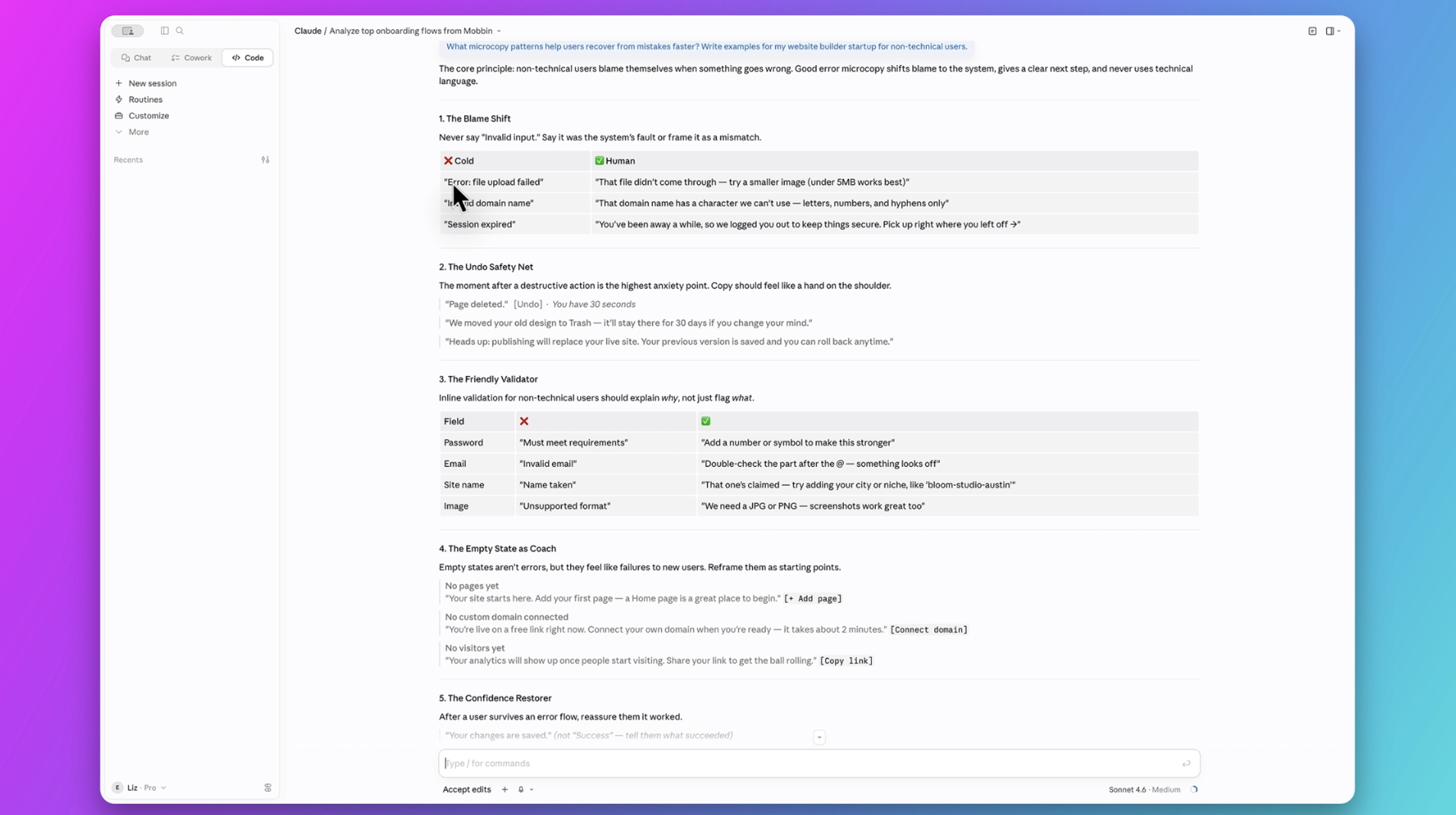
This is really great because there’s a table here showing the kind of default responses we often get when engineers code these experiences without explicit direction or copy from a designer.
So we need to design the copy and the words we use.
Instead of just saying there’s an error, explain what the error is and how the user can fix it. The personality of your product should come through too.
Maybe it’s more playful and says: “Oops, don’t worry. You didn’t do anything wrong. The file is just a little too big for us.” These are the kinds of principles you gather from doing really great research and analysis.
Why UX Research Matters More in the Age of AI
Something to keep in mind is that design patterns ≠ good design patterns.
Just because we are able to see what other apps are doing doesn't meant that it's necessarily good practice or good for our users and our products.
For nearly eight years, now I've been running a Product (UX/UI) Design Course, and it’s become one of the most popular and beloved courses for product and UX/UI designers because there’s a lot of stuff to learn that even great tools like this still can’t do.
Even with Mobbin and AI, we can see examples from successful products, but we don’t really know why those decisions were made.
Those decisions come from research:
- How you analyze themes
- How you observe users
- How you talk to them
- How you extract insights
- Understanding the business goals and KPIs
That’s a big part of what I teach in my course, along with how to use AI tools to speed things up while still keeping a human touch and producing something genuinely valuable for the people using it.
You also get access to Figma and all of their AI products free for an entire year when you enroll.
Use Case 3: Generating Similar UI Concepts
Now, because Claude Code has all of these references, I can ask it to design something based on them.
So now I might ask it to analyze dashboard screens and flows from Mobbin, then generate an original design based on my research. I can upload my own findings and analysis too.
So it extracted a bunch of examples and rendered its own concept based on those patterns.
And this is what it created.
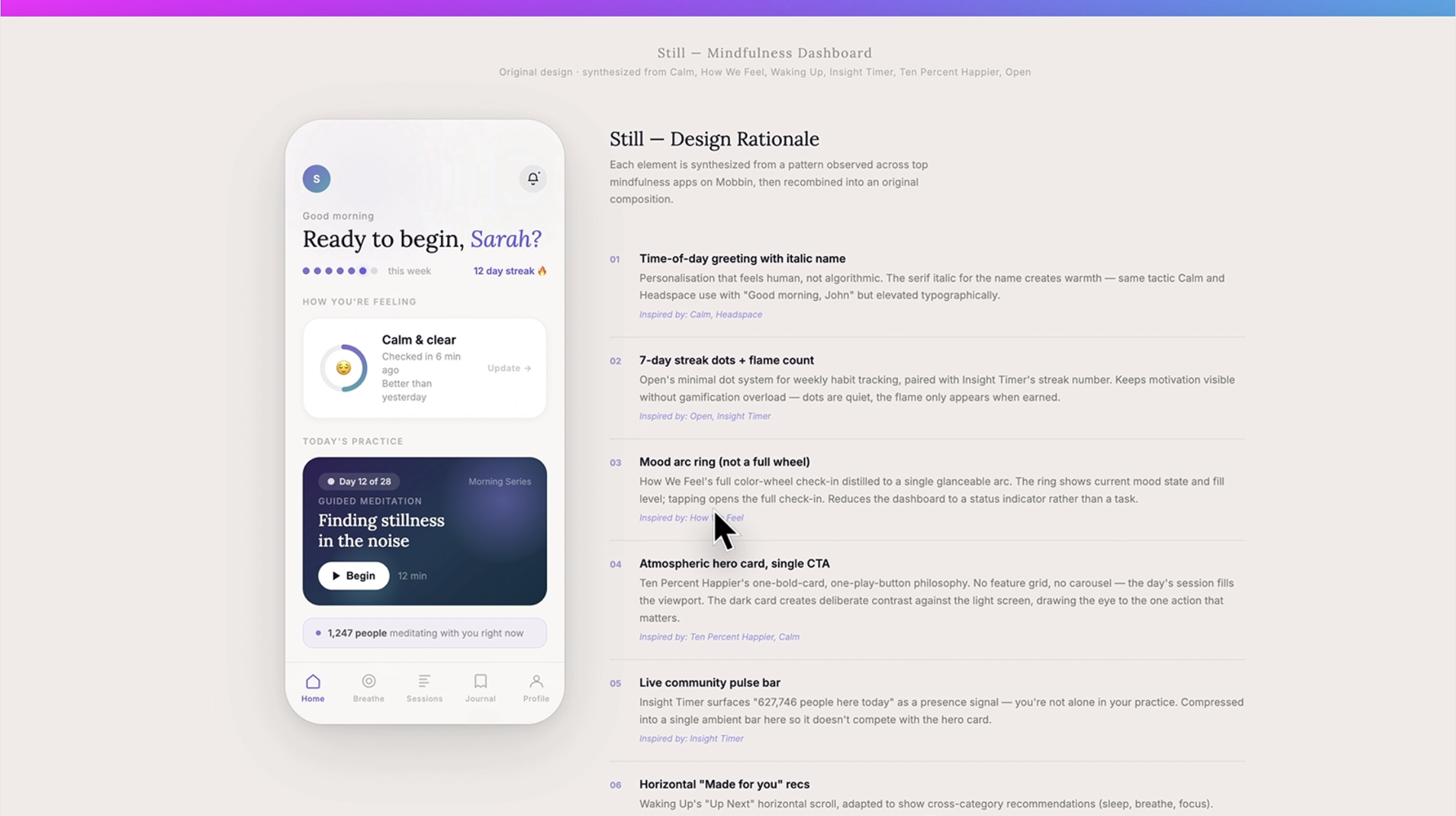
It’s using a lot of the best practices it synthesized from the patterns it observed:
- Time-of-day greeting
- Streak dots with a flame counter
- Mood arc ring
- Atmospheric cards
This is really interesting because it’s helping you analyze what you’re generating — not just generate it — and it’s doing it using tried-and-true examples already out in the wild.
Use Case 4: UX Audit Comparison with Figma MCP
All right, I’ve saved the best for last.
If you also have the Figma MCP set up, you can now start communicating back and forth between Figma and Mobbin via Claude.
First, I’m going to ask it to do a side-by-side audit comparison of my landing page design against common landing pages from Mobbin.
Prompt:
Do a side-by-side comparison of my landing page structure and content against common B2B website landing pages from /mcp Mobbin
I’ll copy a link to the frame in Figma and paste it into Claude.
Now it’s grabbing the Figma design using the Figma MCP while simultaneously searching Mobbin using the Mobbin MCP.
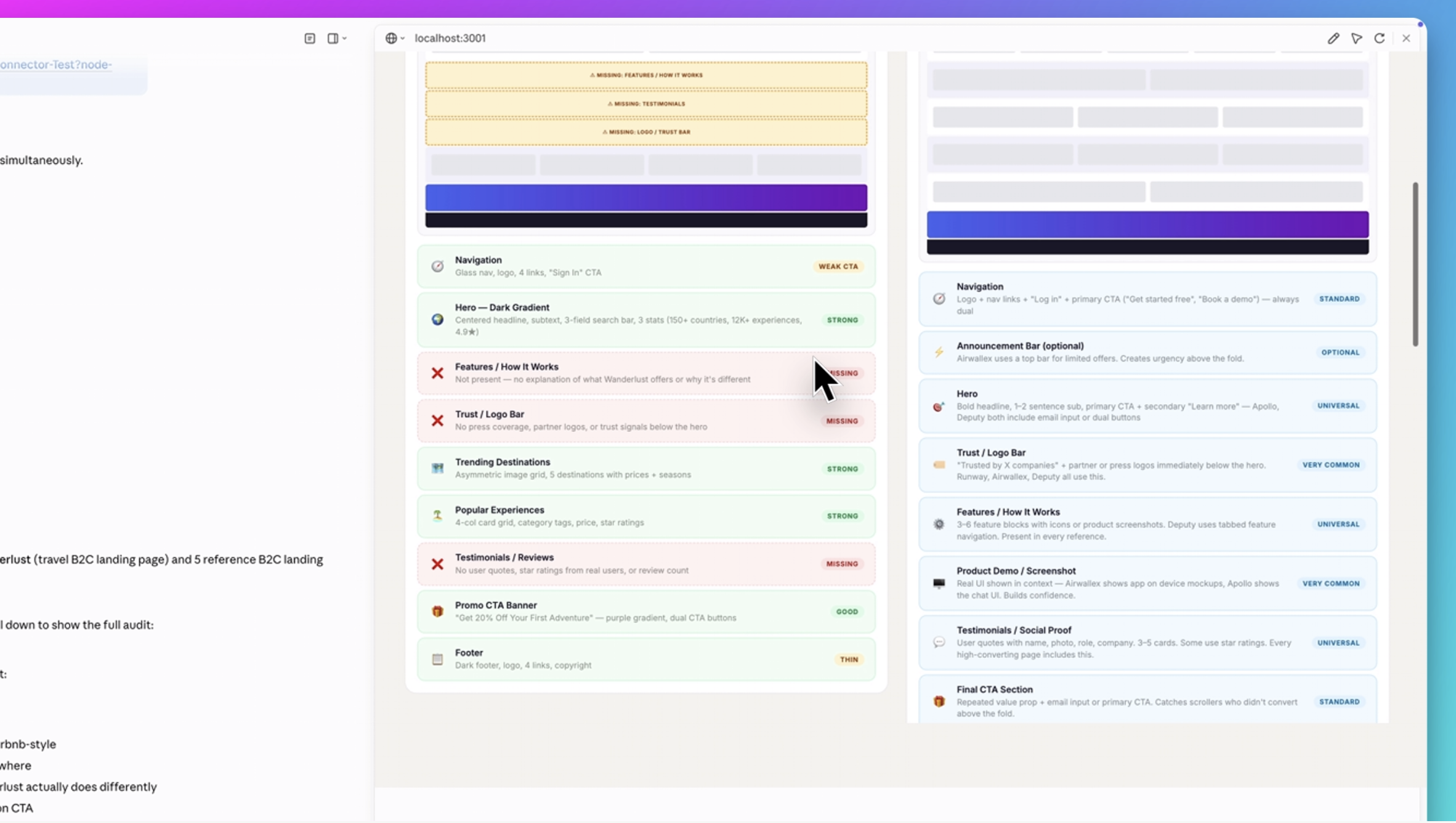
What it’s done is:
- Grabbed the file from Figma
- Performed a deep audit of the page structure
- Rated what’s strong, weak, and missing
- Referenced examples and explained why they work
- Broken everything down section by section
- Given prioritized recommendations
This is an incredible audit and comparison process.
And this is the kind of thing that can save you an enormous amount of time when working on products.
Use Case 5: Sending AI-Generated Designs Back into Figma
Finally, I’m can send all of this back into Figma.
Prompt:
“Generate me a design that includes all of these best practices and recommendations, redesign the page for me, and send it to Figma.”
In about three minutes, Claude Code redesigned the entire page based on those priority recommendations and sent it directly to Figma.
It even named the page “Wonderlust Version 2.”
So let’s go find it in Figma.
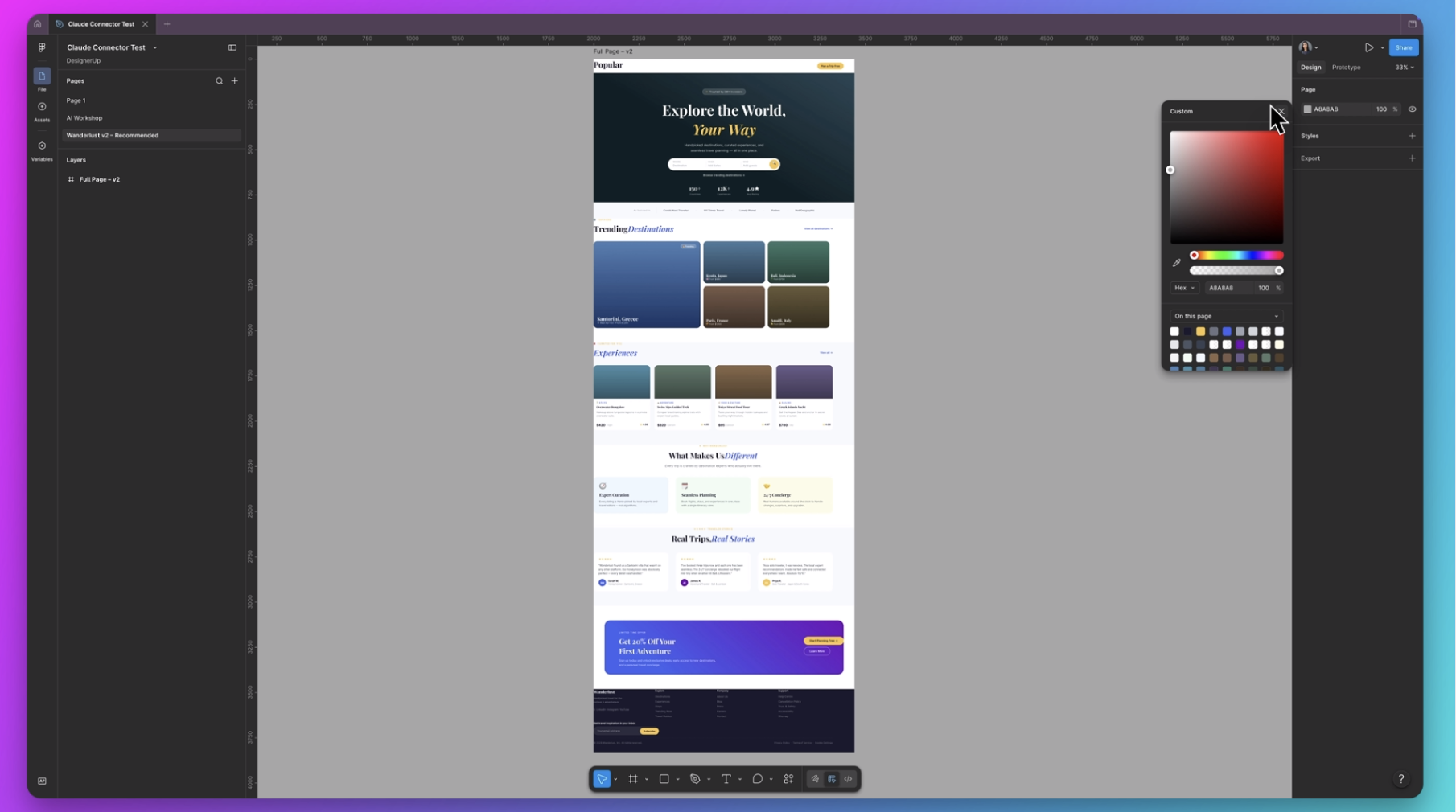
It created a new page called Wonderlust Version 2, and here it is.
Of course, we still need to fix some margins and padding, but it added all of the improvements it recommended.
It still needs a designer’s touch.
But it’s amazing that you can get a rough wireframe or layout idea, refine it, send it back to Claude Code, and then have it code everything up for you.
This continuous cycle from research and inspiration all the way through to creating something real is honestly incredible.
Final Thoughts
Gathering inspiration and evaluating existing designs is something we designers have always done. Mobbin's MCP is a way to speed up that process and help us go through a larger volume of content faster, but it doesn't replace understanding the goals of your business and your users and crafting a custom and unique experience based on your own research.
If you're interested in seeing the other experiments I've done with Mobbin like how to bring designs directly from Mobbin into Figma check out this playlist.
Mobbin is honestly the gift that keeps on giving. If you don’t have a subscription yet, it’s too good not to get. Grab yours here.